" height="7.1149px" id="FTcukYt9G" width="2.46918px"/><path d="M 14.664 0 L 8.602 6.334 L 2.49 12.662 L 2.469 12.683 L 2.469 17.111 L 0 17.111 L 0 12.14 L 3.545 8.472 L 11.85 0 Z" fill="rgb(255, 255, 255)" height="17.111px" id="JEclOrOlY" width="14.6641px"/><path d="M 8.295 6.23 L 5.406 6.23 L 0 0 L 3.097 0 Z" fill="rgb(255, 255, 255)" height="6.230199999999998px" id="A32Do9AoF" transform="translate(6.839 10.88)" width="8.29483px"/><path d="M 9.924 1.295 C 8.952 0.432 7.57 0 5.776 0 C 4.739 0 3.748 0.143 2.801 0.428 C 1.854 0.713 1.044 1.125 0.369 1.662 L 1.357 3.422 C 1.867 2.998 2.492 2.66 3.233 2.407 C 3.974 2.155 4.731 2.029 5.505 2.029 C 6.673 2.029 7.55 2.301 8.134 2.847 C 8.718 3.393 9.01 4.164 9.01 5.157 L 9.01 5.622 L 5.258 5.622 C 3.958 5.622 2.925 5.793 2.16 6.135 C 1.394 6.477 0.843 6.934 0.505 7.504 C 0.168 8.075 0 8.71 0 9.41 C 0 10.11 0.197 10.8 0.592 11.378 C 0.987 11.957 1.551 12.409 2.283 12.735 C 3.015 13.061 3.867 13.224 4.838 13.224 C 6.039 13.224 7.035 13 7.825 12.552 C 8.379 12.238 8.815 11.846 9.134 11.377 L 9.134 13.077 L 11.381 13.077 L 11.381 5.255 C 11.381 3.479 10.895 2.16 9.924 1.295 Z M 7.566 10.829 C 6.899 11.22 6.122 11.416 5.233 11.416 C 4.344 11.416 3.62 11.225 3.11 10.841 C 2.6 10.458 2.345 9.949 2.345 9.313 C 2.345 8.76 2.55 8.286 2.962 7.896 C 3.373 7.504 4.172 7.309 5.356 7.309 L 9.01 7.309 L 9.01 9.118 C 8.713 9.868 8.233 10.437 7.566 10.829 Z" fill="rgb(255, 255, 255)" height="13.223630000000002px" id="VocEMLWwR" transform="translate(15.084 4.033)" width="11.380799999999999px"/><path d="M 14.367 0 L 8.023 14.251 C 7.645 15.163 7.221 15.88 6.752 16.402 C 6.283 16.924 5.768 17.295 5.209 17.515 C 4.649 17.734 4.032 17.845 3.358 17.845 C 2.732 17.845 2.123 17.743 1.53 17.54 C 0.938 17.335 0.428 17.039 0 16.647 L 1.012 14.887 C 1.341 15.197 1.703 15.433 2.098 15.596 C 2.493 15.759 2.913 15.841 3.358 15.841 C 3.934 15.841 4.411 15.694 4.79 15.401 C 5.168 15.107 5.521 14.586 5.851 13.836 L 6.267 12.924 L 0.493 0.001 L 2.962 0.001 L 7.526 10.355 L 12.047 0.001 Z" fill="rgb(255, 255, 255)" height="17.84464px" id="tBjxqkJt3" transform="translate(26.835 4.155)" width="14.367299999999997px"/><path d="M 9.924 1.295 C 8.952 0.432 7.57 0 5.776 0 C 4.739 0 3.748 0.143 2.802 0.428 C 1.855 0.713 1.044 1.125 0.37 1.662 L 1.357 3.422 C 1.867 2.998 2.492 2.66 3.233 2.407 C 3.974 2.155 4.731 2.029 5.505 2.029 C 6.673 2.029 7.55 2.301 8.134 2.847 C 8.718 3.393 9.01 4.164 9.01 5.157 L 9.01 5.622 L 5.258 5.622 C 3.958 5.622 2.925 5.793 2.16 6.135 C 1.394 6.477 0.843 6.934 0.506 7.504 C 0.168 8.075 0 8.71 0 9.41 C 0 10.11 0.197 10.8 0.592 11.378 C 0.987 11.957 1.551 12.409 2.283 12.735 C 3.015 13.061 3.867 13.224 4.838 13.224 C 6.04 13.224 7.035 13 7.826 12.552 C 8.379 12.238 8.815 11.846 9.134 11.377 L 9.134 13.077 L 11.38 13.077 L 11.38 5.255 C 11.38 3.479 10.895 2.16 9.924 1.295 Z M 7.566 10.829 C 6.899 11.22 6.122 11.416 5.233 11.416 C 4.344 11.416 3.62 11.225 3.11 10.841 C 2.6 10.458 2.345 9.949 2.345 9.313 C 2.345 8.76 2.55 8.286 2.962 7.896 C 3.373 7.504 4.172 7.309 5.356 7.309 L 9.01 7.309 L 9.01 9.118 C 8.713 9.868 8.233 10.437 7.566 10.829 Z" fill="rgb(255, 255, 255)" height="13.223630000000002px" id="CzZaw0etF" transform="translate(41.005 4.033)" width="11.380300000000005px"/><path d="M 14.083 12.754 L 3.687 12.754 L 1.408 17.749 L 0 17.749 L 8.245 0 L 9.551 0 L 17.796 17.748 L 16.388 17.748 Z M 13.597 11.663 L 8.885 1.42 L 4.2 11.663 Z" fill="rgb(255, 255, 255)" height="17.7487px" id="Q9MGA6hKQ" transform="translate(58.083 0)" width="17.795900000000003px"/><path d="M 0 0 L 1.306 0 L 1.306 17.748 L 0 17.748 Z" fill="rgb(255, 255, 255)" height="17.7482px" id="y1_76E5id" transform="translate(79.132 0)" width="1.3057000000000016px"/></g></svg>)

BuildingConnected integration
Kaya connects to Autodesk BuildingConnected and turns selected bid packages into a leveling session, so your team compares scope instead of moving files.
Connect BuildingConnected
How it works

Connect BuildingConnected
Authorize the integration from Kaya. Existing
BuildingConnected users move straight into
project selection.
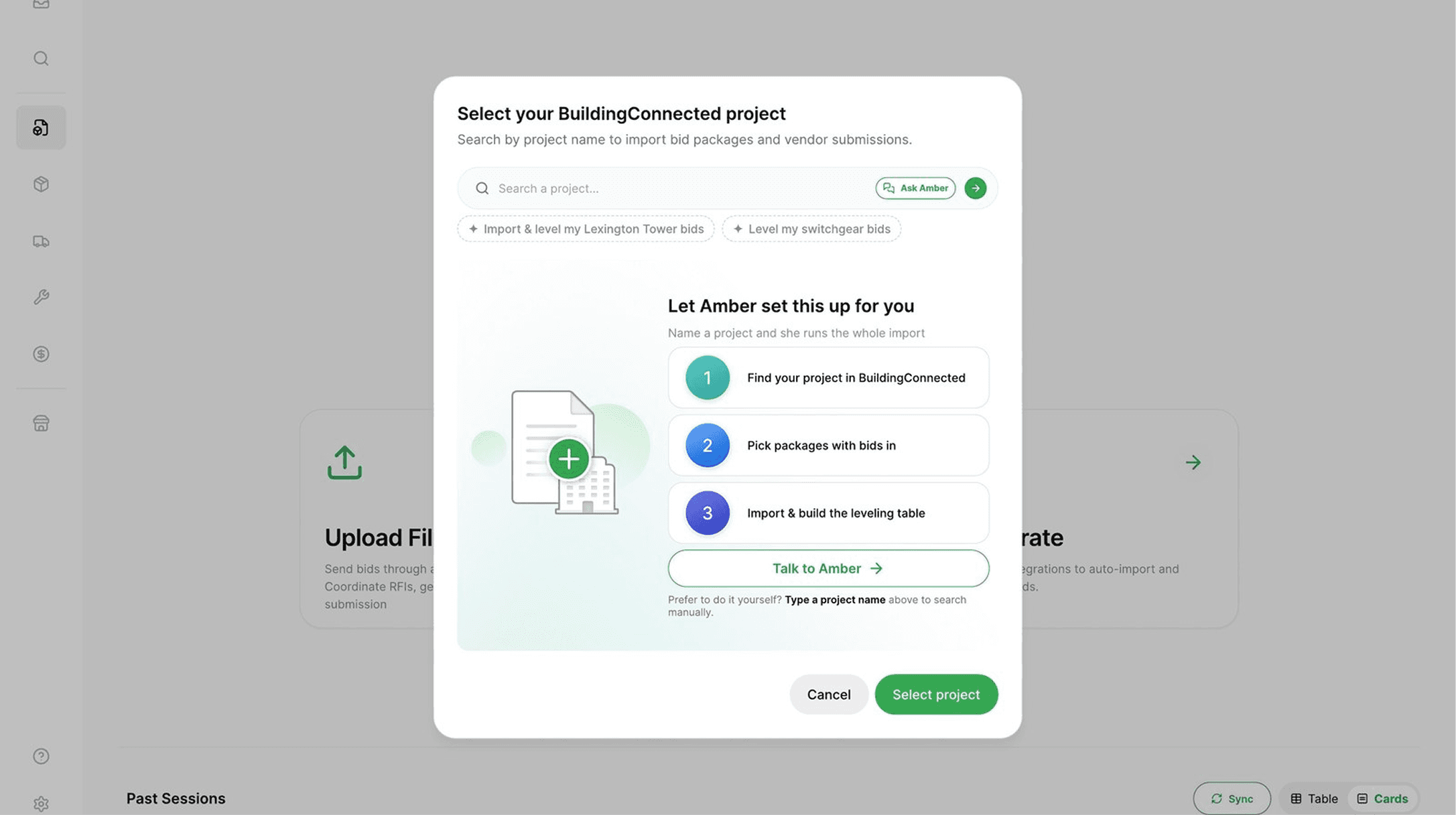
Choose project and packages
Select the BuildingConnected project, then
choose the bid packages or scopes you want
to import.

Create the leveling session
Kaya imports and organizes documents, bids
and line items, then creates the bid leveling
analysis.
Features
Authorize the integration once, pick the BuildingConnected project, and Kaya pulls the documents, bids and line items into a structured leveling session.
Discover More

The payoff
The bid process stays in BuildingConnected. The analysis moves forward in Kaya.


Stop moving bid files.
Start leveling them.